
Know-how
What an AI may do in accounting, and what it may not
Lessons from an accounting system that runs every day with AI suggestions. The AI proposes, the system calculates, a person approves.
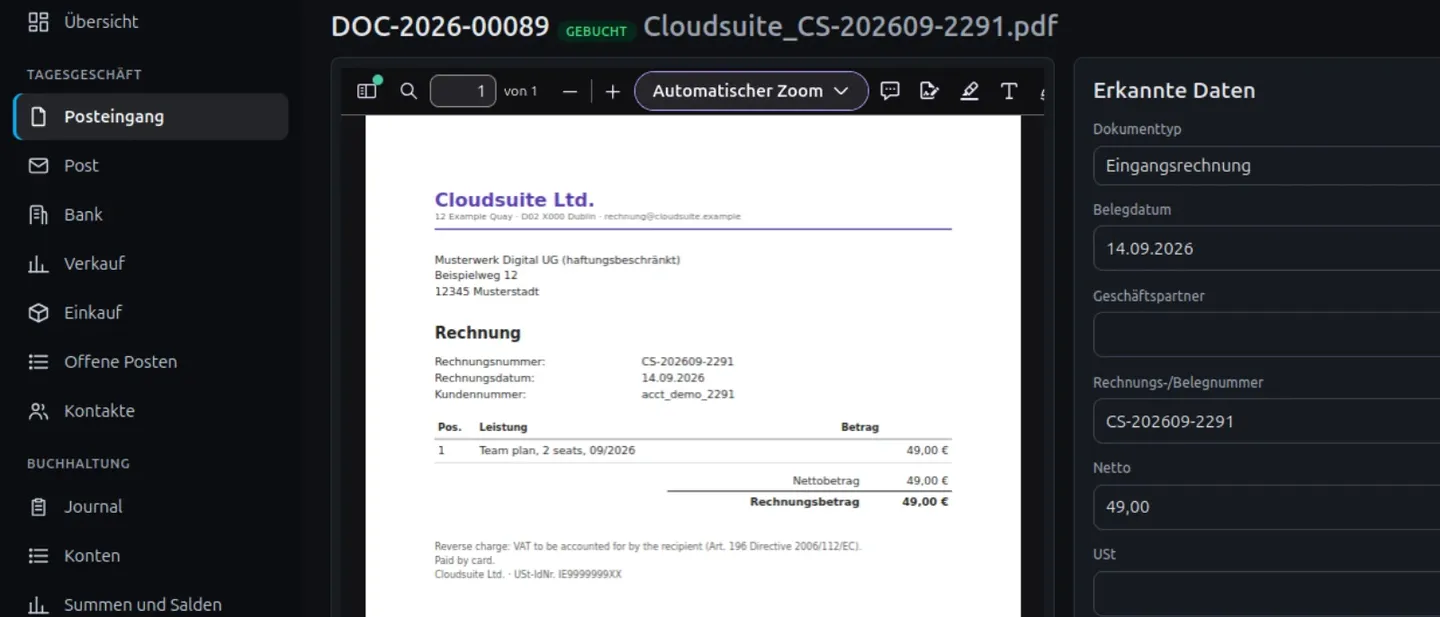
All I wanted was a trial balance. My accounting software did not have one, and as a limited company with a balance sheet obligation I need it. The sensible solution would have been to find another program, migrate, done. Instead I built my own accounting system. Not because accounting is easy, but because it is very clearly regulated: chart of accounts, tax codes, debit and credit, the DATEV format, balance sheet structure. Clear rules are exactly what software needs.
Today that application runs as my real accounting: double-entry bookkeeping to SKR04, a receipt archive with text recognition, bank reconciliation, open items, invoices, VAT returns and DATEV export for the tax adviser. An AI assistant makes suggestions along the way. What I learned is less a story about technology than a story about limits.
The accounting part was not the problem
Once the rules were described cleanly, a surprising amount of it could be implemented with AI support. A receipt arrives, text recognition reads the supplier, date, amount and tax rate, and the assistant proposes a booking. That works well because the answer is usually unambiguous. An office invoice for 49 euros with 19 percent VAT lands on the account where it belongs.
Things creaked elsewhere. Importing data from the old program. Tests that accidentally ran with real credentials. Time zones in the backup logic. And the question that runs through everything: how much automation actually makes sense?
The rules the system runs by today
Each of those mishaps became a fixed rule. Together they describe what the AI in my accounting may do and what it may not.
- The AI proposes, the system calculates, I approve. No suggestion becomes a booking before a person has confirmed it. Totals, taxes and balances are calculated by the software, not by the language model.
- No free access to the database. The AI only gets clearly defined tools: read a receipt, propose a booking, match an open item. Nothing more.
- What is locked stays unchanged. Nobody can alter booked and locked transactions afterwards, not even me.
- Mistakes are reversed, not overwritten. A wrong booking gets a reversing entry. The mistake stays visible, as the principles of proper bookkeeping require.
- Receipts and bookings carry hash values. That way it shows when a file or a record has been changed after the fact.
- Everything is logged and backed up daily. And restoring from the backup is tested, not just assumed.
- Uncertainty is made visible. If text recognition is unsure about an amount, the system asks instead of guessing.
The question turns around
At the start I asked: what can the AI take over? After a few months I ask instead: what must it never decide on its own? I believe that is exactly the difference between a nice demonstration and a system you trust in daily use. The demonstration shows how much is possible. The everyday system shows where the limits are, and keeps to them.
For accounting that means: the AI is a very good assistant. It sorts, reads, proposes and saves me hours every week. The responsibility stays with me, and the system is built so that it has to stay there.
Would I recommend this to everyone?
No. For most businesses an off-the-shelf accounting program is the better choice. It is audited, the tax adviser knows it, and it costs less than a custom build. I wanted to know whether it could be done, and I needed the trial balance.
What does carry over are the building blocks: capturing and reading receipts automatically, proposing bookings, reconciling bank statements, handing data to the tax adviser in the right format. Exactly these building blocks go into the automations I set up for other businesses, with the same rules for approval and traceability. What that can look like for your receipts is described under Receipts that file themselves.