
Know-how
Route planning: how the computer plans the routes for three technicians
A heating installer in Cologne, 24 jobs, three technicians and the real road network: how a plan made by hand becomes routes that keep every appointment.
Transcript
1. 7 a.m. at a heating installer in Cologne: 24 jobs pile up, three technicians. By hand: split the city, mornings first, then the nearest.
2. Routes by hand on the real map of Cologne: 163 km, 7.2 h in the van, 3 missed appointments, 4.2 h overtime. Note: demo, real map (© OpenStreetMap contributors), made-up jobs.
3. The computer moves, swaps and reverses: 70,000 variants, the kilometres drop.
4. Same jobs, better routes: 140 instead of 163 km (−14 %), 6.5 instead of 7.2 h, 0 instead of 3 missed, 0.5 instead of 4.2 h overtime.
5. The day plays out: vans on real streets, a timeline per technician.
6. Emergency in Porz, arrive by 12:00. Just added at the end: 5 h 21 min late. Re-planned: on site at 10:25, nothing missed.
7. €10,032 per year on days like this.
8. Planning by hand: hours. Checking a proposal: minutes.
9. Where do your people drive too much? fk-onlineservices.de
7 a.m., the routes are waiting
In many trade businesses the day's routes are planned by hand in the morning. The jobs are on the desk or in the calendar, the technicians are already in the yard. Whoever plans splits the city roughly: one drives west, one north, one across the Rhine. First the appointments with a morning time window, then always on to the nearest customer.
That is sensible, and it usually works out somehow. But planning by hand costs in two places: people sit in the van longer than necessary, and when one area is busier than expected, someone arrives late at a customer or gets home far too late in the evening. An emergency in the morning then throws everything out.
I rebuilt exactly this problem in my demo application. It shows step by step how a list of jobs turns into routes that fit the time windows, and what happens when an emergency comes in during the day.
The example: a heating installer in Cologne
The business in the demo is based in Cologne-Ehrenfeld. On this day there are 24 jobs spread across the whole city, and three technicians go out. The working day runs from 7:30 to 16:30; anything later is overtime.
The jobs are typical for a service department: servicing a gas boiler (one hour), replacing a thermostat or a flue gas test (half an hour each), measuring up for a bathroom, setting up a heat pump (an hour and a half), and the urgent cases "heating has failed" and "no hot water", where the technician has to be there by 12 noon. Some customers want a morning appointment, some only from 1 p.m.
The map is real: the Cologne road network from OpenStreetMap, from motorways down to district roads, with the Rhine and its bridges. Routes run over these roads, with a speed per road type plus four minutes for parking. The jobs are made up, but spread the way they occur in a service business. With your addresses it works the same way.
The screenshots come from the German version of the demo.
Step 1: Planning by hand
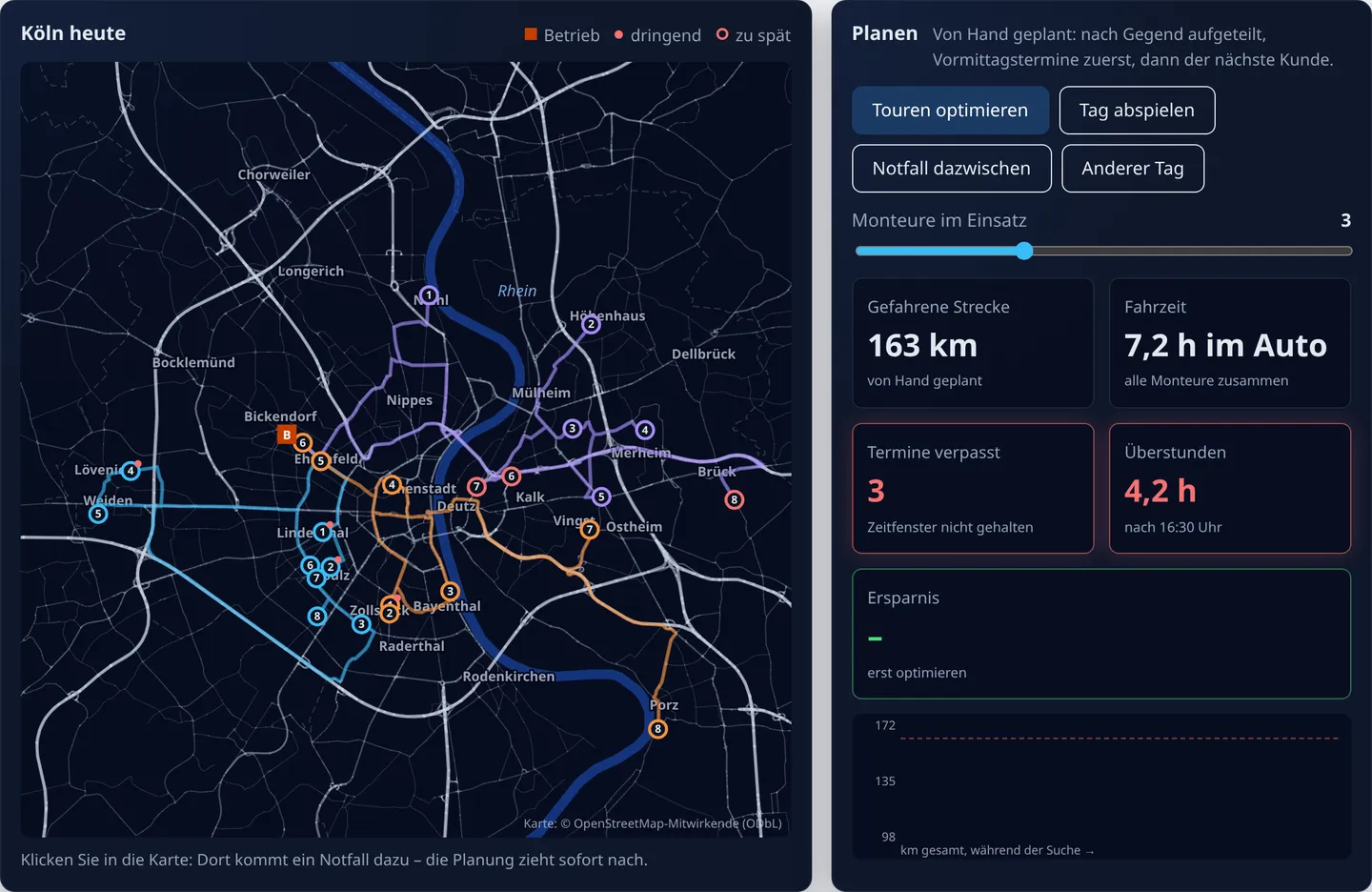
The starting point is a plan as it comes about by hand: the city divided into three areas by direction from the base, one technician per area, morning appointments first, then always the nearest customer.
The result: 163 km, 7.2 hours in the van for all three technicians together. Two technicians get back roughly on time. The third drew the busy area east of the Rhine: he is not back at the base until 20:01, arrives late at three customers (50 minutes in Kalk, 86 minutes in Deutz, almost two and a half hours in Brück) and alone works more than three hours of overtime. In total it is 4.2 hours of overtime.
The plan is not stupid. It is just blind to the fact that the areas are not equally busy and that one appointment with a time window can shift a whole afternoon.
Step 2: The computer tries variants
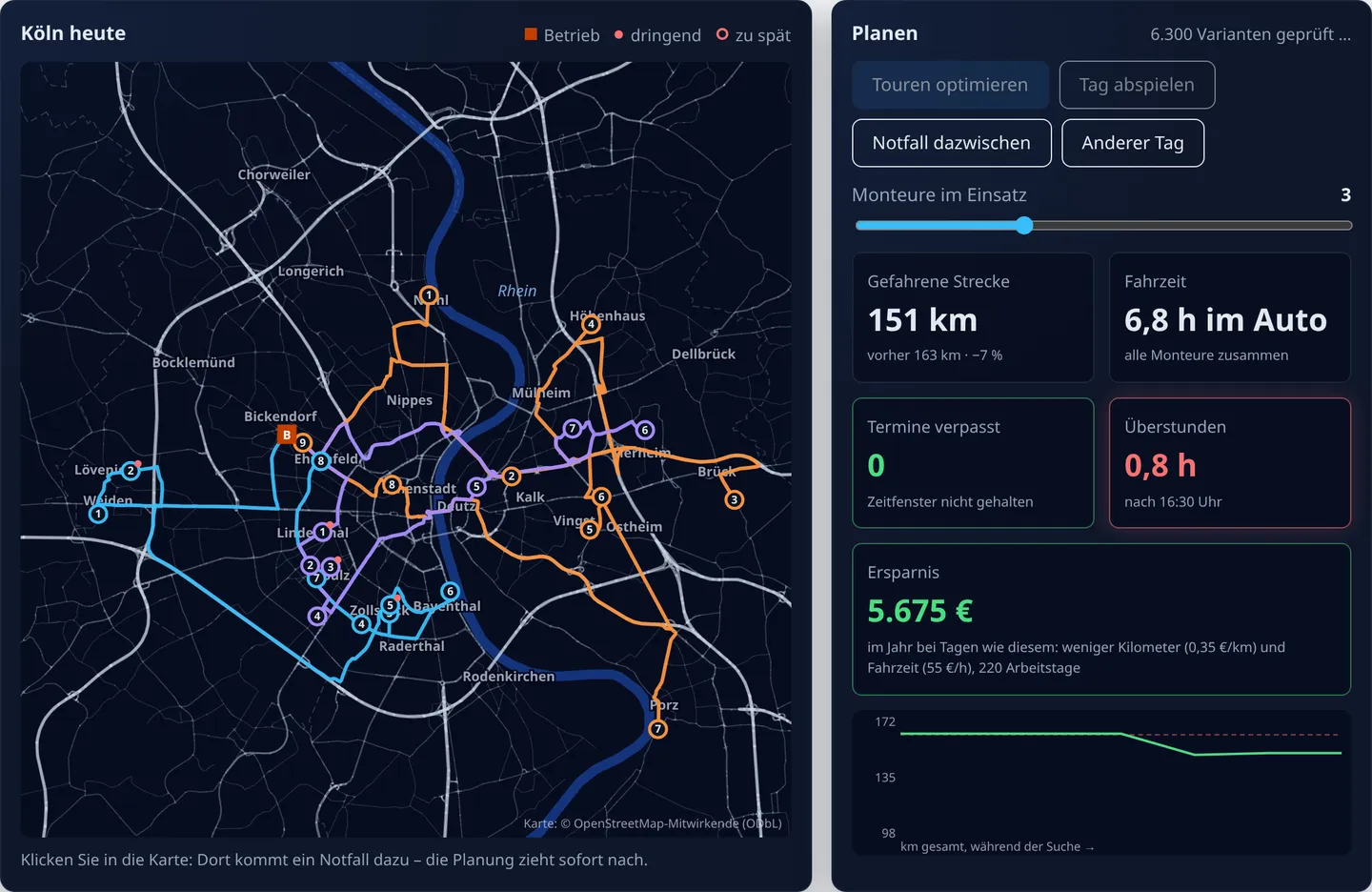
Now a search method takes over. It makes small changes to the plan, the kind you would also try by hand: move a job to another technician, swap two jobs, reverse part of a route. Each change is scored: driving time, plus a heavy penalty for every minute a customer waits and a smaller one for overtime. Whatever is better stays. Early on a worse variant may stay too, so the search does not get stuck in the first decent solution. The method is called simulated annealing.
In the demo it tries 70,000 variants in a few seconds, right in the browser. The curve at the bottom right shows the kilometres during the search: most of the improvement comes within the first few thousand variants.
Step 3: Same jobs, better routes
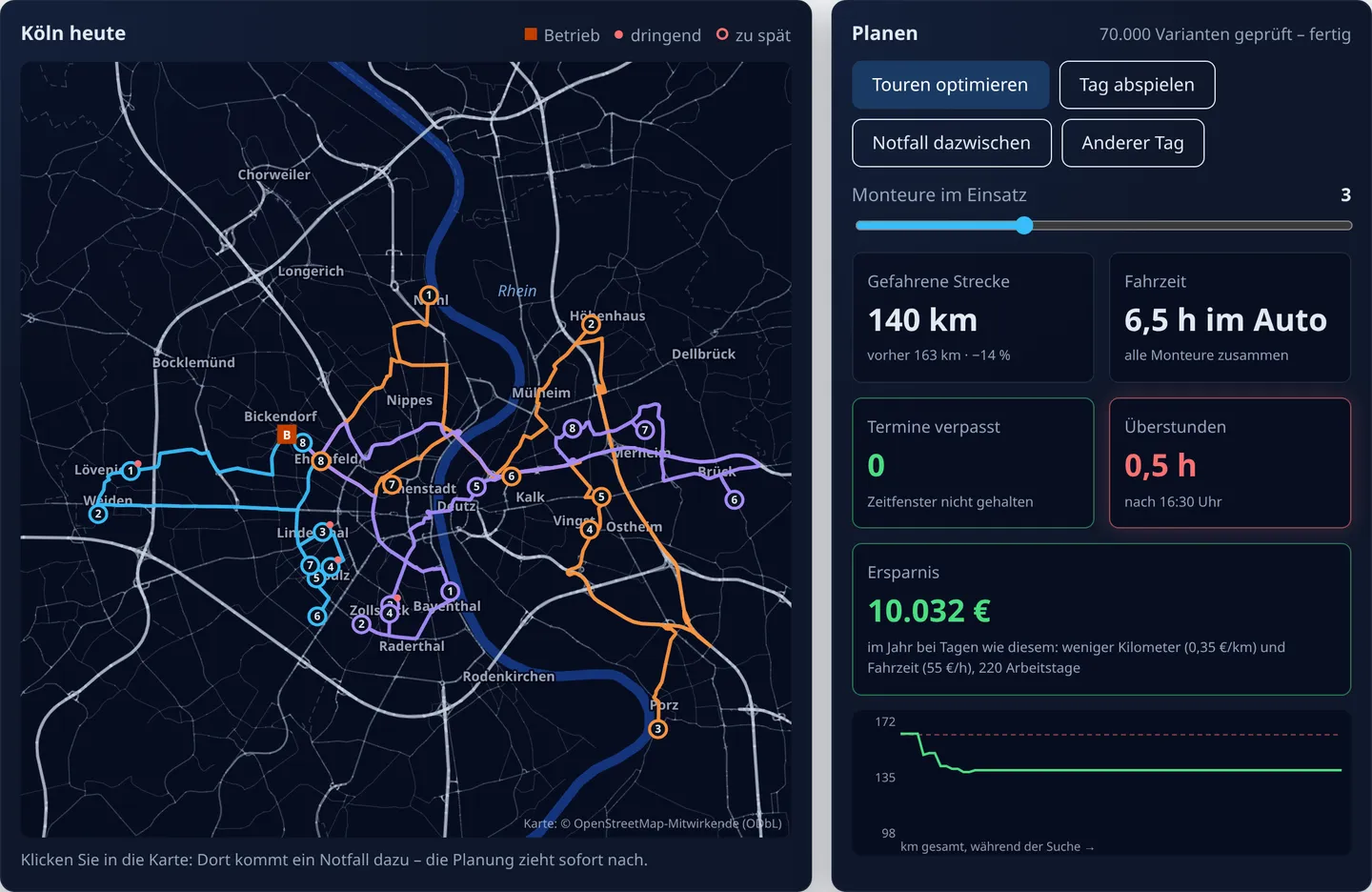
With the same 24 jobs and the same three technicians:
| By hand | Proposal | |
|---|---|---|
| Distance driven | 163 km | 140 km (−14 %) |
| Time in the van | 7.2 h | 6.5 h |
| Missed appointments | 3 | 0 |
| Overtime | 4.2 h | 0.5 h |
| Last technician back | 20:01 | 16:51 |
The 14 % fewer kilometres are nice. The real gain is in the lower rows: no customer waits, and nobody drives until eight in the evening. The work is spread more evenly: instead of one overloaded area, one technician picks up Porz and Vingst on the way, another takes Deutz and Brück.
Step 4: The technicians' day
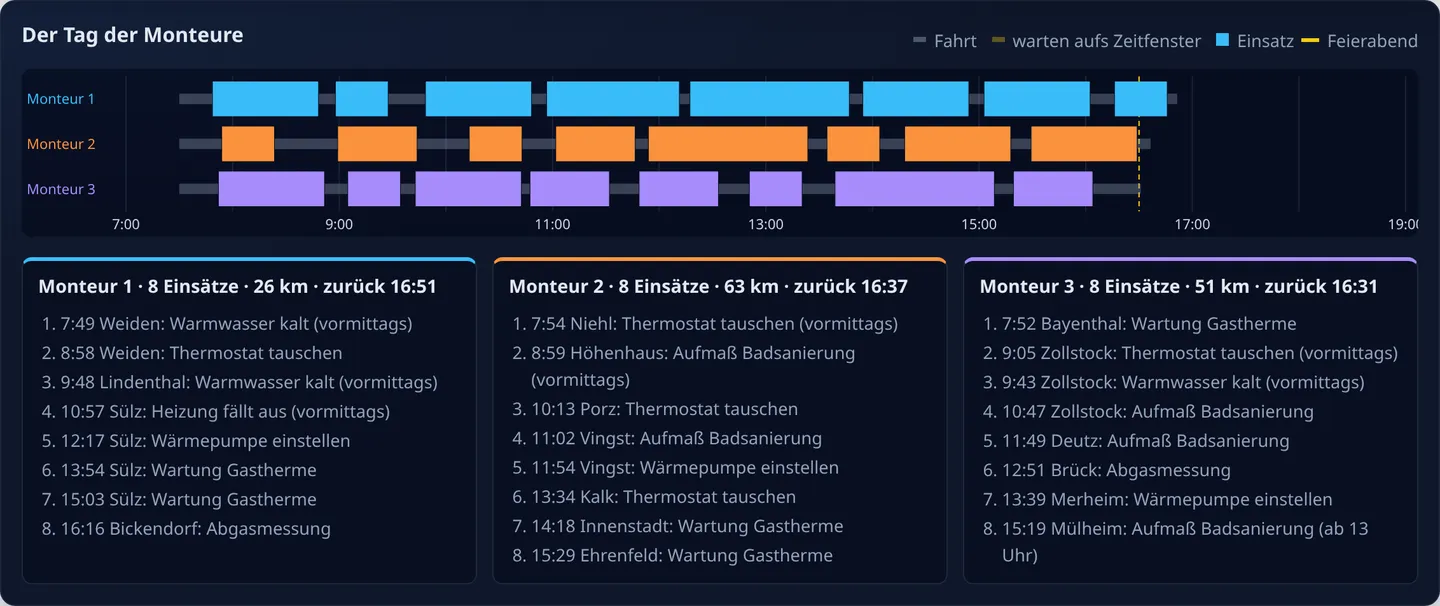
For each technician the demo shows the day as a timeline: driving, waiting for a time window, on the job. Below it is the list he takes along, with time, district and job. If you like, you can play the day and watch the vans drive along the real roads.
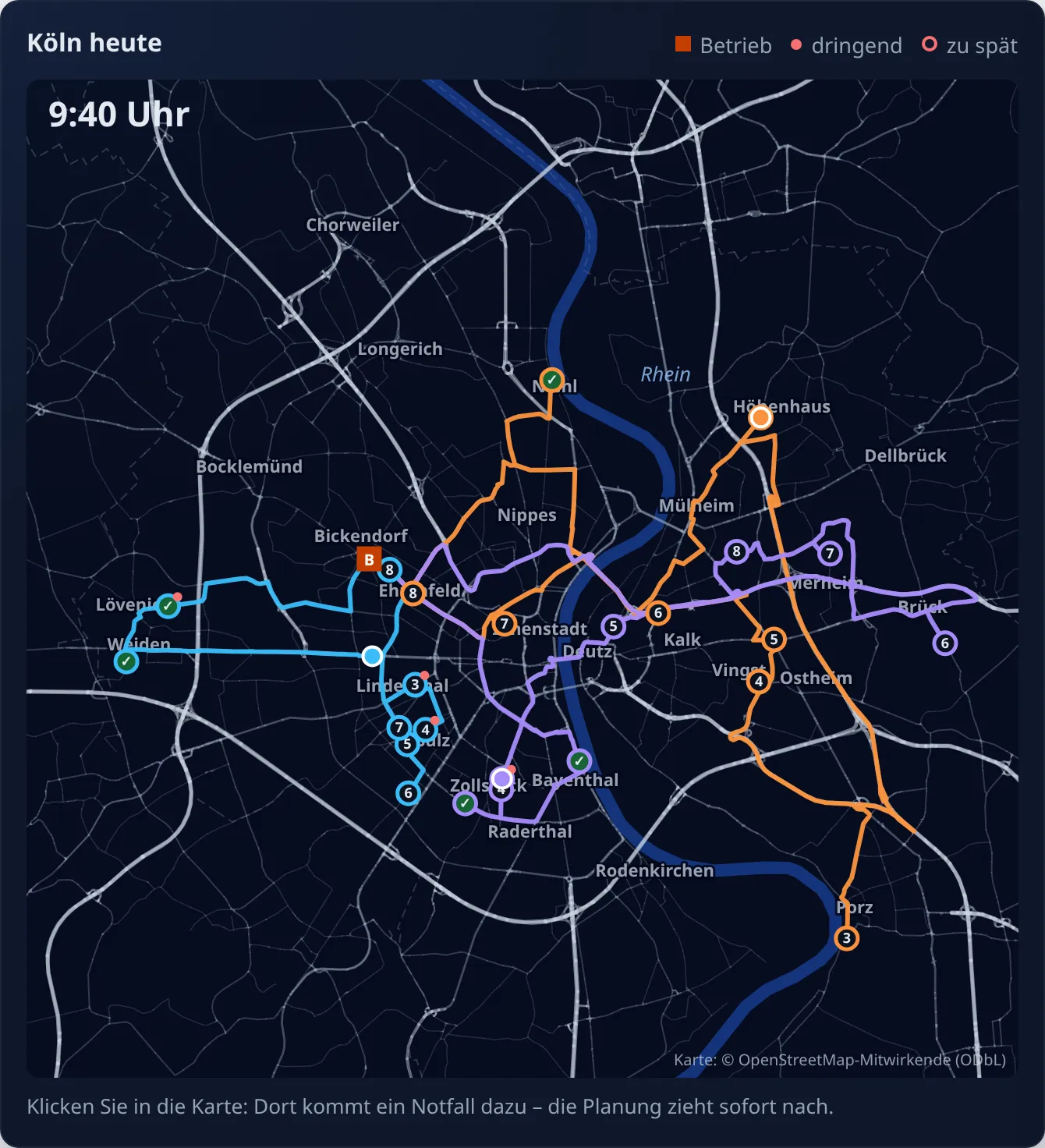
And then an emergency comes in
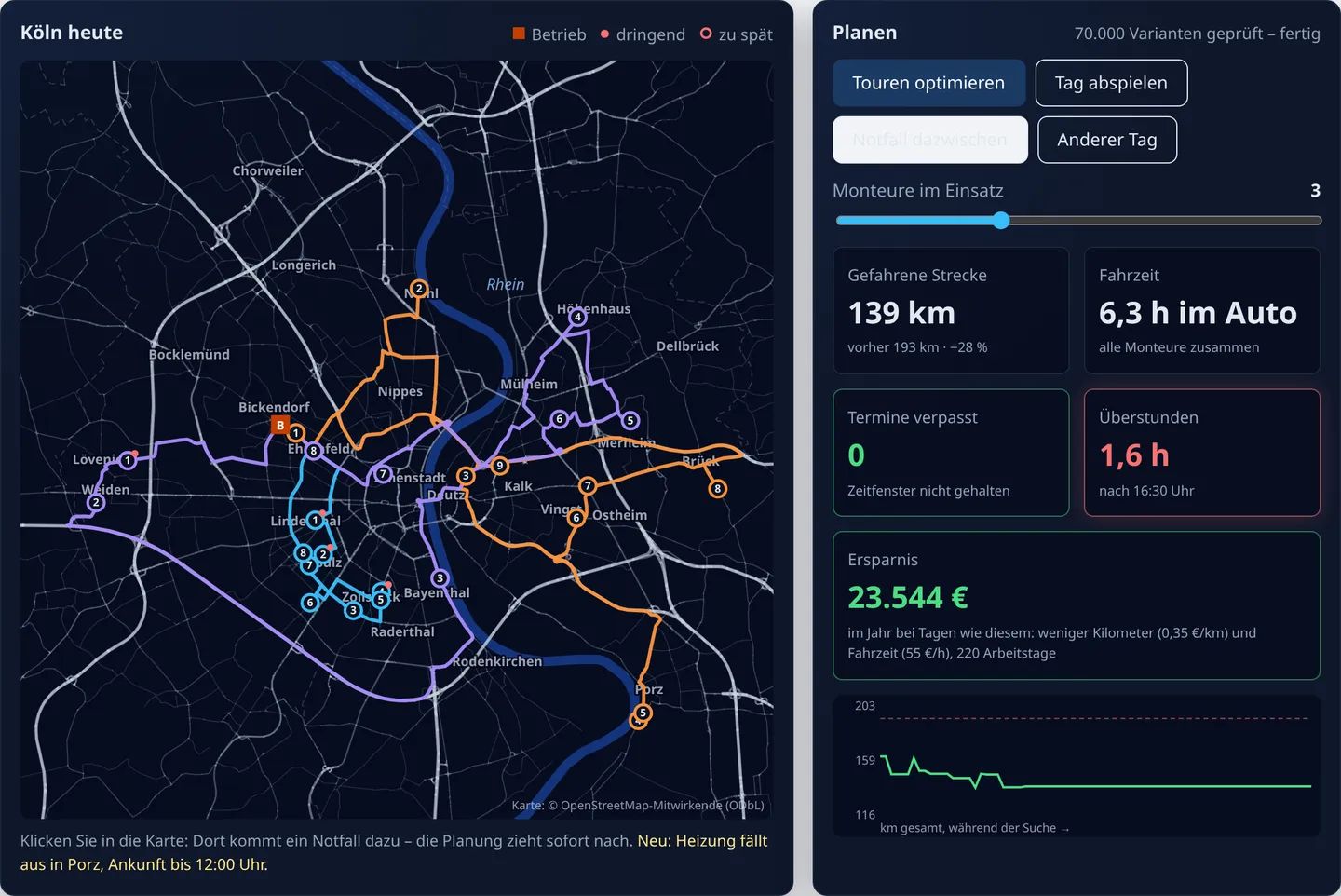
A call comes into the plan: heating has failed in Porz, and the technician should be there by 12 noon. On the spot you would add the job to the end of the technician with the fewest appointments. In the demo he would then arrive 5 hours and 21 minutes late.
Instead, the planning recalculates. Result: a technician is in Porz at 10:25, takes nine jobs instead of eight, and no appointment is missed. To be honest: it does not come free. Overtime rises to 1.6 hours, because one more job is one more job. But you see straight away what the emergency costs and who is best placed to take it.
What that adds up to over a year
On this one day the proposal saves 23 km and 41 minutes in the van. The demo extrapolates this with open assumptions: €0.35 per kilometre, €55 per hour of driving time, 220 working days. On days like this that is around €10,000 a year.
That covers only kilometres and driving time. The overtime avoided (from 4.2 to 0.5 hours) and the three customers who did not have to wait are not included. And with two technicians instead of three, the day could not be done even with the best plan; the demo shows that too when you move the slider.
And the planning time? An example calculation
The demo does not measure how long planning routes by hand takes, and it differs in every business. So here is an example calculation with open assumptions that you can replace with your own figures:
| By hand | With a proposal | |
|---|---|---|
| Split up the jobs and set the order | 30 minutes | 10 minutes: check the proposal, move special requests |
| Fit in emergencies and cancellations, call the technicians | 15 minutes | 5 minutes: recalculate, let them know |
| per working day | 45 minutes | 15 minutes |
Under these assumptions half an hour a day is left over, so over 220 working days around 110 hours a year. That is not a measurement, but a calculation.
What the planning deliberately does not do
- Not over your head. It makes a proposal. If a customer only wants a particular technician, you move that, and the rest is recalculated.
- No tracking. The demo plans with addresses, time windows and durations, not with the location or performance of individual employees.
- No outside routing service. Map and road network come from OpenStreetMap. In the demo everything runs in the browser; in a real application on your application's server in Germany.
Not just for the trades
The pattern fits wherever people drive to several jobs a day: home care, delivery, field sales, maintenance and cleaning. From about three vehicles and a dozen jobs a day, planning by hand gets hard to keep track of.
What it needs you usually already have: the addresses of the jobs, an estimated duration per job type and the time windows you promise your customers. There is more on the route planning page. You can try the example from this post yourself in the demo application, including your own emergency with a click on the map.
Where do your people drive too much?
Describe in three sentences how many people drive to how many jobs and how you assign them today. You get a free initial assessment of whether route planning is worth it for you.